
Quick Summary
Event badge printing is the process of creating personalized credentials for attendees, speakers, exhibitors, sponsors, staff, press, and VIP guests. Although badges are often treated as a small production detail, they influence check-in speed, networking, access control, event branding, lead capture forms, session tracking, and the overall attendee experience.
The right printing method depends on how stable the registration list is, how many last-minute changes are expected, how long the event will run, and what each badge must accomplish. Pre-printed badges offer greater production control, on-site badge printing provides flexibility and can cause long wait times if not executed properly., and a hybrid model combines pre-printed credentials with an event-day reprint station.
Materials can range from paper inserts and Cardboard Badges to waterproof plastic badges. QR codes and barcodes can also connect a physical credential to registration, access, analytics, and exhibitor systems.
The strongest event badge printing strategy treats the badge as part of the customer journey rather than as a last-minute name tag. When an attendee can collect a badge quickly, read other people’s names easily, and traverse through different areas without any barriers, the entire event feels more organized.
Here’s what Amanda our CEO thinks about this:
Registration is your event's first impression, and first impressions set the tone. When check-in feels effortless and the badge looks intentional, attendees arrive with confidence in everything that follows.
What Is Event Badge Printing?
Event badge printing is the creation of individualized identification or access credentials for people attending or working at an event. These credentials can include conference badges for general attendees, speaker badges, staff credentials, sponsor passes, exhibitor badges, press passes, VIP badges, and access credentials for restricted areas.
Each badge usually contains two types of information.
The first is static information that appears on every badge, such as the event name, dates, event branding, venue, and sponsor logos. The second is variable data that changes for each attendee, including the attendee’s name, company, title, ticket category, access level, QR code, barcode, or assigned sessions.
This distinction allows event organizers to create one badge design and automatically populate hundreds or thousands of individual records. Attendee details can be imported through a registration platform, CSV file, spreadsheet, or direct badge integrations.
For example, planners may create name badges from Excel, import name badges from Google Sheets, or connect registration data from another event platform. Conference Badge supports variable attendee data, spreadsheets, QR codes, barcodes, multiple badge templates, and double-sided layouts.
Badges can be printed before the event, produced as attendees arrive, or managed through a hybrid approach. The correct choice affects staffing, equipment, check-in speed, waste, quality control, and how easily the event team can respond when registration data changes.
At a 40-person corporate meeting with a finalized guest list, pre-printing every badge may be straightforward. At trade shows or conventions where exhibitors change representatives and attendees register at the door, printing every credential weeks in advance can create unused badges and long correction lines.
The badge workflow should reflect how the event actually operates.
Event use cases extend well beyond traditional conferences. Event badges are used at corporate meetings, university symposia, association summits, festivals, fundraising events, concerts, executive retreats, networking events, conventions, and multi-day events.
A university dean hosting a research conference may prioritize institutional affiliation and academic department. At a trade show, exhibitors may need credentials connected to lead retrieval. At a concert or festival, the primary concern may be access control, durability, and permission to enter production zones.
The badge type should follow the operational purpose rather than forcing every event into the same format.
Event Badge Printing Options
One of the first decisions is whether credentials will be printed before attendees arrive, printed at the venue, or handled through a combination of both.
That decision affects far more than production. It determines how the registration area is staffed, how corrections are handled, how much equipment is needed, and what attendees experience in the first few minutes of the event.
Pre-Printed Event Badges
Pre-printed badges are produced before the event and shipped to the organizer or printed internally. They are usually sorted alphabetically, by organization, by attendee category, or by arrival group.
This approach works well when the attendee list is stable. Corporate meetings, academic events, board gatherings, executive retreats, and smaller conferences often know who will attend several days before the event.
Pre-printing gives the planning team time to inspect names, test codes, organize lanyards, load inserts into badge holders, and prepare an orderly registration area.
The main advantage is predictability. Staff can arrive with completed printed name badges and distribute them without waiting for a printer to generate each credential.
The tradeoff is reduced flexibility. Attendee information frequently changes after the initial order. A speaker may update a title, an exhibitor may replace a representative, or a sponsor may add another guest.
Consider a 175-person corporate conference with a registration deadline two weeks before the event. The team prints all 175 badges and organizes them by surname. In the final week, 12 people cancel and nine replacements are submitted.
The original approach remains useful, but only because the organizer also has a way to print nine updated credentials. Without a reprint plan, those attendees may receive handwritten labels or visibly altered badges.
Pre-printing works best when it is supported by a limited correction and reprint process rather than the assumption that the attendee list will never change.
On-Site Badge Printing
On site printing produces each credential at the venue after the attendee checks in. A guest may scan a registration confirmation, enter a name at a kiosk, or speak with a staff member. The system finds the registration record, applies the attendee details to the appropriate badge design, and sends the badge to a printer.
On-site badge printing works especially well for large conferences, events with walk-ins, multi-day events, conventions, and programs where attendee information changes until the final hours.
It can also reduce waste because credentials are printed primarily for people who actually arrive.
Corrections become easier as well. When an attendee’s name is misspelled or a job title changes, staff can update the record and print a replacement that looks consistent with every other badge.
That creates a much stronger attendee experience than handing a senior guest an adhesive label and a marker.
The flexibility comes with operational responsibility. The event organizer needs compatible printers, badge stock, devices, power, trained staff, a reliable data connection or offline alternative, and enough supplies to handle peak arrival periods.
A system that works well during an office test may struggle inside a venue where hundreds of devices share the same Wi-Fi. Printers can jam. Stock can be loaded backward. Browser print settings can change. QR codes can be difficult to scan from damaged phone screens.
These issues do not make on-demand printing a poor choice. They mean that the printing station should be treated as an event production system rather than as a desktop printer placed casually beside the registration desk.
Hybrid Badge Printing
A hybrid model combines pre-printed badges with an on-site reprint or late-registration station. It is often the most practical option for medium and large events.
Under this approach, the organizer pre-prints badges for attendees whose information is confirmed. Staff, sponsor, speaker, and VIP badges may receive additional quality control because mistakes involving these groups tend to be especially visible.
Late registrations, corrections, substitutions, and replacements are then printed at the venue.
Imagine an association conference with 800 attendees. The team pre-prints 720 confirmed credentials and organizes them across several alphabetical pickup stations. A separate help desk handles walk-ins and corrections using an on-site printer.
Most attendees collect their badge within seconds. People who need assistance receive focused support without stopping the main line.
The challenge is consistency. On-site credentials should match the pre-printed badges in material, color, size, and layout. Otherwise, late registrants may receive badges that visibly mark them as an afterthought.
Types of Event Badges
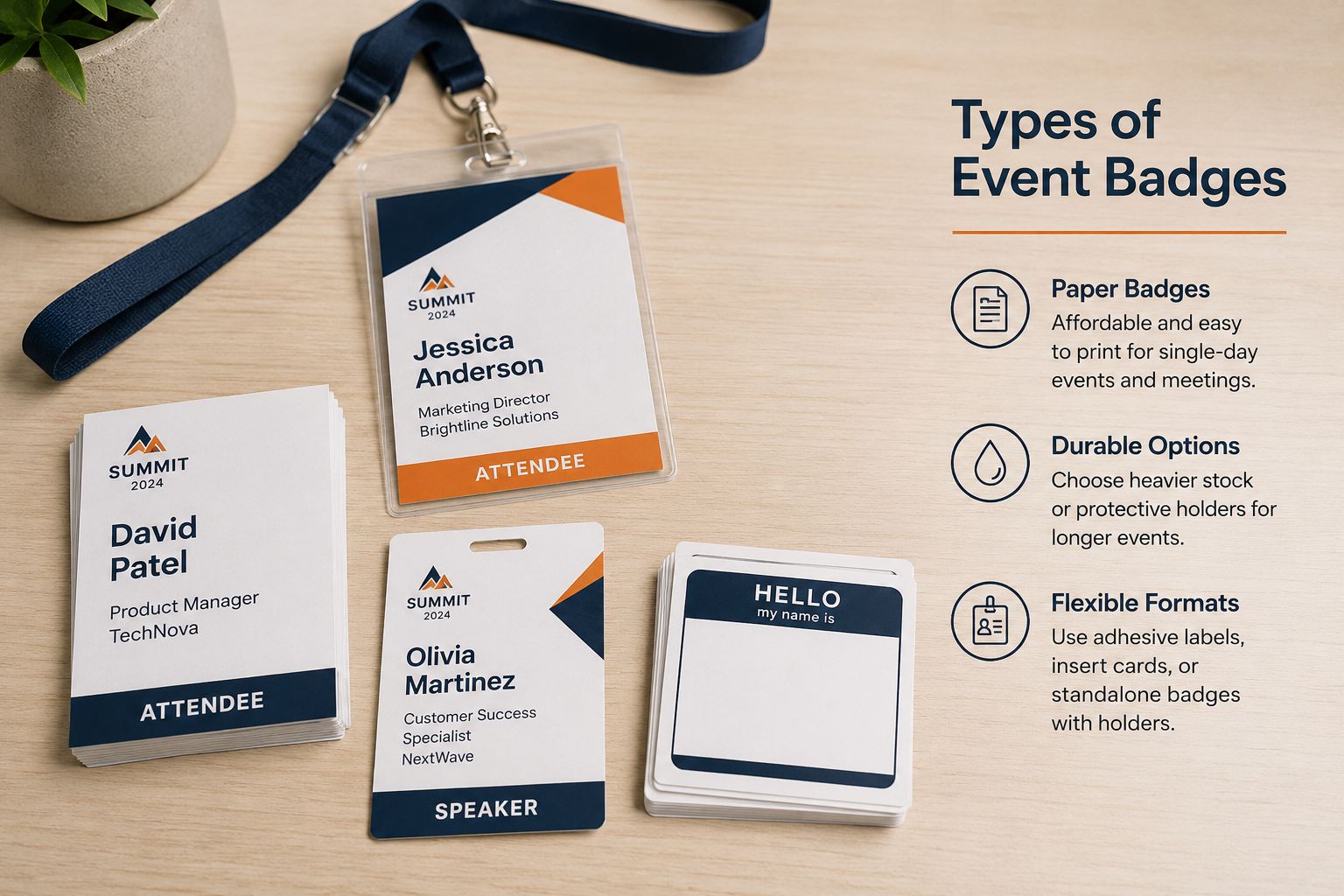
Not all badges are the same, or are useful in every type of event.
Material affects how a badge feels, how long it lasts, whether it requires a holder, how it handles moisture, and which printing technologies it can support.
The most expensive material is not necessarily the best one. A credential should be durable enough for the event without adding unnecessary cost or waste.
Paper Event Badges
Paper badges are affordable and appropriate for many single-day meetings, internal corporate events, workshops, academic gatherings, and smaller conferences.
They may be printed as adhesive DIY name tags, cut as standalone credentials, or inserted into plastic holders.
Paper is easy to print using common office equipment, but ordinary printer paper can curl, tear, absorb moisture, and look worn after several hours. When paper is used, its thickness and finishing method should match the way the badge will be worn.
A small internal meeting may need only a simple insert. A day-long networking conference may require heavier stock or a protective holder.
Cardboard Badges
Cardboard Badges provide more structure than lightweight paper while avoiding a separate plastic pouch. They can be printed in full color printing, hole-punched, and attached directly to lanyards.
This format works well for conferences, corporate offsites, university events, and networking programs where organizers want a more substantial credential without the assembly requirements of separate inserts and holders.
Conference Badge offers double-sided card stock badges in two common formats, https://www.conferencebadge.com/products/cardboard-badges
The practical advantage is that the printed credential can arrive ready to use. Staff do not need to load every insert into a separate holder.
The tradeoff is exposure. Unprotected card stock may not be the best option for outdoor festivals, wet environments, or credentials that must withstand several days of repeated handling.
Inserts and Badge Holders
Insert badges combine a printed paper or card insert with a reusable clear holder. Search phrases such as “Inserts holders badges” or “Name badge print outs” usually refer to name badge inserts, plastic badge holders, or printed inserts supplied with holders.
This format remains common because the holder protects the insert and can sometimes be collected and reused. It is especially useful for multi-day events where the credential will be handled repeatedly.
Conference Badge offers insert-and-holder formats in several dimensions, https://www.conferencebadge.com/products/inserts-holders-badges
The disadvantage is assembly. When inserts and badge holders arrive separately, event staff may spend hours loading them before registration opens.
Clear holders can also reflect venue lighting. This can make small text difficult to read and interfere with QR codes or barcodes. A badge should therefore be tested inside the actual holder rather than reviewed only as a flat PDF.
Plastic Badges
Plastic badges offer greater durability and a premium appearance. They are often used for VIP badges, staff credentials, sponsor passes, multi-day events, and events where attendees may keep the credential afterward.
A rigid or laminated PVC badge can be waterproof, resistant to bending, and suitable for repeated scanning.
Plastic badges can also support security features or embedded technology that may not be practical on ordinary paper.
The main tradeoffs are price, sustainability, and flexibility. A rigid plastic badge may be harder to reproduce at an event-day help desk, and errors can be more expensive to correct.
A laminate can provide durability without requiring a fully rigid card, but lamination creates an additional production step. It may be worthwhile for a four-day convention and unnecessary for a two-hour corporate meeting.
Eco-Friendly Event Badges
Sustainable badge options may include recycled paper, holder-free cardboard, reusable holders, biodegradable components, bamboo accessories, seed paper, or lanyard collection programs.
The best environmental option depends on the event’s full operational system.
A compostable badge provides limited value when the venue has no appropriate composting stream. A reusable holder reduces waste only when it is collected and used again. A durable badge may sometimes produce less waste than several failed replacements.
Event organizers should look beyond isolated marketing claims and consider sourcing, shipping, assembly, reuse, collection, and disposal.
RFID or NFC Event Badges
Radio Frequency Identification (RFID) and Near Field Communication (NFC) badges communicate with compatible readers through radio-frequency technology. They may support access control, session tracking, cashless payments, contactless information exchange, or attendance analytics.
These credentials are useful when scanning happens frequently or when attendees need to move through checkpoints quickly.
At a large convention, RFID may help reduce lines at controlled entrances. At a multi-track conference, it may help record entry into specific sessions.
The added capability also introduces greater complexity. The organizer needs compatible readers, properly encoded credentials, secure databases, trained staff, and working badge integrations.
The national institute of standards and technology NIST advises organizations to evaluate RFID as a complete system that includes tags, readers, databases, networks, security controls, and privacy risks.
For many corporate meetings or smaller conferences, a qr code may provide enough functionality at a lower cost. RFID becomes more useful when the event has high scan volume, layered permissions, or a clear need for contactless reading.
QR Code or Barcode Badges
QR code and barcode badges are commonly used for check-in, attendee verification, session tracking, lead retrieval, networking, and access control.
A unique code typically represents a registration identifier. When scanned, the connected system retrieves the relevant attendee record or records a specific interaction.
Reliable scanning depends on code size, contrast, print quality, placement, lighting, device quality, and the accuracy of the associated data.
Codes should not be crowded against an edge, fold, lanyard hole, or holder seam. They should also remain separate from busy graphics and sponsor logos.
GS1 guidance emphasizes leaving a clear quiet zone around a barcode so scanners can recognize the boundaries of the symbol.
The same principle applies to QR codes for events. A code is an operational component, not simply a decorative graphic.
Common Event Badge Sizes and Formats
There is no single standard badge size that is correct for every event.
Badge sizes should be chosen according to viewing distance, information volume, material, orientation, attachment method, and the role the credential plays.
A 3-by-4-inch badge is compact and supported by many standard holders. It can accommodate a prominent name, company, event logo, and a modest QR code when the layout remains simple.
A 4-by-6-inch badge offers more room for networking information, attendee categories, access details, sponsor logos, or a larger scanning area.
Larger event badge sizes are often better for conferences and trade shows because names can be read before two people are standing uncomfortably close to one another.
Horizontal badges can work well for short names and compact branding. Vertical badges often create a more natural hierarchy for a large first name, followed by company, title, attendee type, and code.
Double-sided credentials provide additional space without crowding the front. The front can focus on the attendee’s name and identity, while the reverse may include a schedule, map, Wi-Fi details, sponsor message, or support contact.
Insert badges must be designed according to the internal dimensions of the badge holders, not only the holder’s advertised outer size. Important content can be clipped by sealed edges or seams.
Tear-resistant synthetic credentials may be suitable for outdoor programs, festivals, multi-day events, or events where badges are scanned frequently.
The best way to choose a format is to work backward from the most important task.
When networking is the primary goal, test name visibility from several feet away. When scanning is essential, test the code through the intended holder. When staff must identify access categories quickly, test whether badge colors remain distinct under venue lighting.
What Information Should Be Printed on an Event Badge?
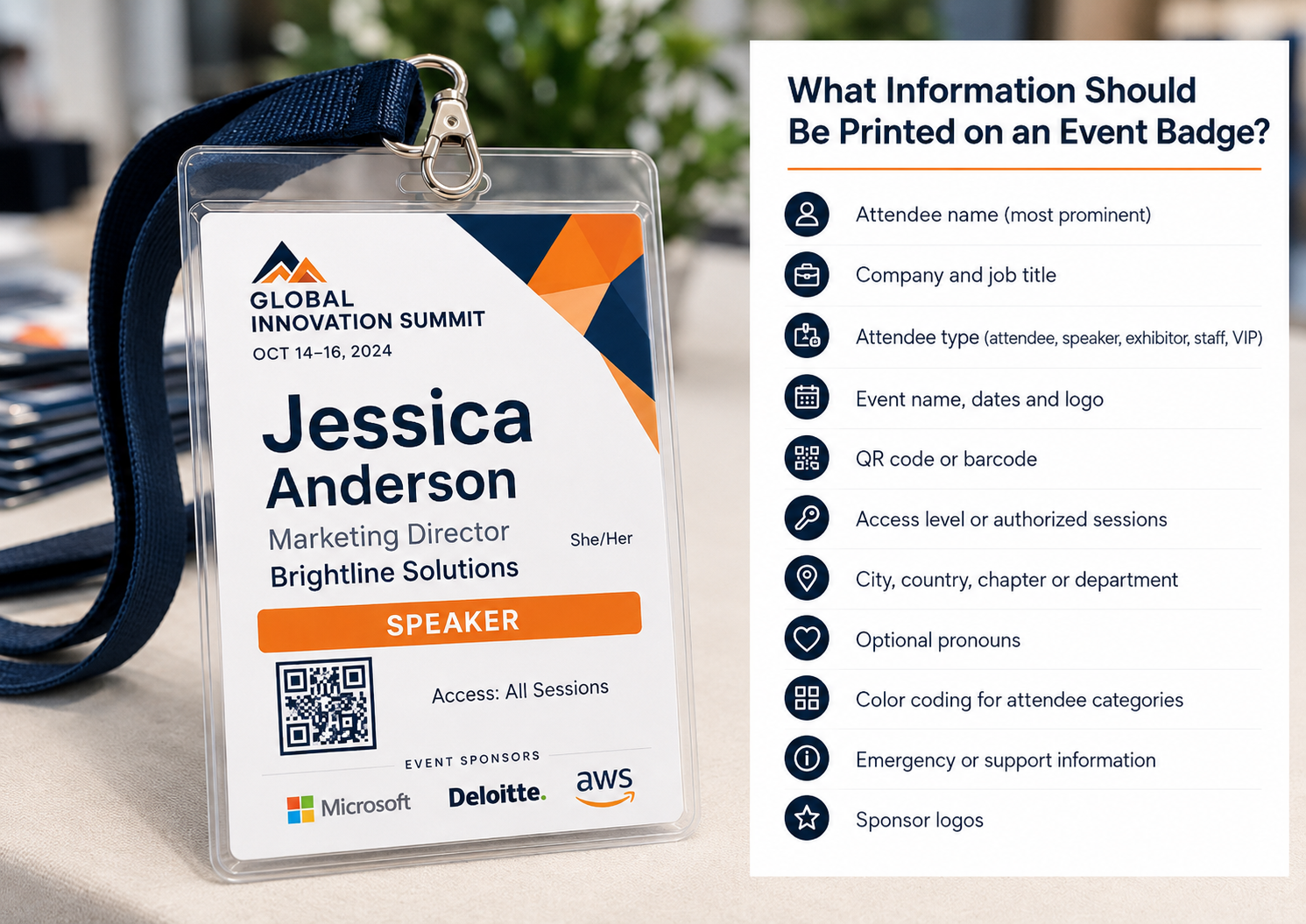
A badge should communicate useful information in the order people need it. That does not mean filling every available inch.
The attendee’s name should normally be the most prominent element. In many networking settings, the first name can be larger than the surname because conversational recognition matters more than database-style formatting.
The company and job title help attendees understand why they may want to speak with one another. At a university event, department, institution, or research area may be more relevant. At an association conference, a city, chapter, or membership category may help create connections.
Other possible badge elements include:
Attendee type, such as attendee, exhibitor, speaker, staff, sponsor, press, or VIP
Event name, dates, and logo
Company and job title
Sponsor logos
QR code or barcode
Access level
Authorized sessions or event zones
City, country, chapter, or department
Optional pronouns
Color coding for attendee categories
Emergency or support information
The important question is not whether information can fit. It is whether the information needs to be visible on the attendee’s body.
Meal preferences may be useful to catering staff but unnecessary to everyone in the room. A registration identifier may matter to software while being meaningless as printed text.
Sensitive personal or internal information should not be added simply because it exists in the attendee database.
Event Badge Design Best Practices
Good badge design creates an information hierarchy that can be understood almost immediately. Poor badge design forces people to search through event logos, decorative graphics, sponsor messages, job titles, and tiny text before finding the attendee’s name.
Make the Attendee’s Name Easy to Read
A planner researching a “Font event name tag” should focus less on finding a fashionable typeface and more on selecting one with clear letterforms and sufficient weight.
Thin script fonts, highly condensed typefaces, and long lines of capital letters can be difficult to read under conference lighting.
Test the longest names in the attendee file, not only a short placeholder such as “Alex Lee.” Variable data can expose design problems that are invisible in an empty badge template.
A badge layout that looks balanced with a 10-character name may fail when a longer name is imported.
Create a Clear Visual Hierarchy
The badge should generally present the person’s name first, followed by the organization or role, and then supporting information.
Event branding should be visible, but it should not compete with the person wearing the badge.
This hierarchy supports the customer journey. The logo confirms that the credential belongs to the event. The name helps attendees begin a conversation. The organization provides context. The qr code supports a scan or transaction.
When every element has equal visual weight, none of them works particularly well.
Use Strong Contrast and White Space
High contrast improves readability and scanning. Dark text on a light background remains a dependable choice, although well-tested inverse designs can also work.
White space is functional. It separates information, makes the attendee’s name easier to find, and protects scanning areas.
Crowded badge layouts often result from trying to satisfy too many stakeholders. Every sponsor or department wants another logo or message included.
Sponsor logos can provide valuable visibility, but they should not make attendees feel that they are wearing an advertisement instead of an identity credential.
Design Around the Physical Badge
A badge does not remain flat on a computer screen. It may sit inside a reflective holder, hang from a single clip, rotate on a lanyard, or fold against clothing.
Important information should remain clear of slot punches, trim lines, and holder seams.
A single-clip badge may turn backward repeatedly. If both sides contain important information, consider a two-point attachment or repeat essential identity elements on both sides.
Custom lanyards can reinforce event branding or identify attendee categories, but their width and clip style must fit the badge.
Test a Physical Sample
A digital proof can confirm spelling, field placement, and general visual structure. It cannot reveal every physical issue.
Print the badge at actual size. Put it into the selected holder. Attach the intended lanyard. Wear it while walking. Test the code under bright and dim lighting.
That simple process can reveal glare, weak contrast, poor attachment placement, excessive movement, and scanning problems that were not visible in the design file.
Here’s what Amanda thinks about this:
“The best badge is not usually the one with the most design elements. It is the one that lets a guest recognize a name, understand a role, and complete a scan without stopping to figure out how the badge works.”
Event Badge Printing With QR Codes, Barcodes, RFID, or NFC

Adding technology to a badge can connect the physical event to registration, attendance, exhibitor, and access systems.
A QR code may allow an attendee to check in, enter a session, exchange contact information, or allow an exhibitor to record a lead.
A barcode can perform similar tasks using compatible scanners. RFID and NFC can support faster or contactless interactions when the necessary infrastructure is available.
One of the most important decisions is what information the credential actually stores.
In many cases, the code should contain a unique identifier linked to a protected attendee record rather than exposing the person’s full contact details in plain text.
This approach gives the organizer more control over what an authorized scanner can retrieve. It also allows a registration record to be updated without changing the code printed on the badge.
Fast Check-In
Before the event, the attendee receives a registration confirmation containing a code. At arrival, the code is scanned and matched to the attendee record.
The system marks the attendee as present and may trigger a badge print.
This process reduces manual searching, but only when the registration system, attendee record, badge template, and check-in system all use the same identifier.
Disconnected systems can create duplicate records, incorrect badges, or attendees who appear to be unregistered.
Lead Retrieval
At trade shows, exhibitors may scan event badges to capture leads. A scan may record the attendee’s authorized contact details, the exhibitor performing the scan, the time, and qualification notes.
Lead retrieval turns the badge into a data exchange point.
The organizer must therefore determine what consent was obtained, what information will be shared, and whether attendees understand what happens when a badge is scanned.
A large QR code may scan well but create privacy concerns when attendees believe anyone with a phone can access their details. Clear communication and controlled software access are as important as print quality.
Session Tracking
Scanning badges at session entrances can support continuing education credits, attendance verification, capacity management, and program analysis.
However, the badge cannot compensate for a weak operational setup.
When one staff member must scan 300 attendees through a narrow doorway within five minutes, even a technically perfect barcode will not solve the throughput problem.
Staffing, door placement, scanning equipment, and conference room layout all influence the result.
Access Control
Badges can display attendee categories visibly, encode access permissions digitally, or combine the two approaches.
A colored staff badge may support quick recognition, while an electronic scan provides more precise access control at restricted entrances.
Visible colors alone can be copied. Digital scanning alone may be too slow for staff making rapid decisions. Events with higher security requirements may need layered controls, such as visible categories, unique serialization, controlled scanners, and photo identification.
Testing and Backup Planning
Unique codes should be generated correctly and matched to the intended attendee before production.
Test badges should include:
Short and long attendee names
Multiple ticket and attendee categories
Different mobile phones and scanning devices
The actual badge stock and holder
Bright and low-light conditions
Codes at the minimum intended size
Records with corrected or updated attendee details
A backup plan may include manual registration lookup, replacement credentials, printed attendee lists, spare scanners, additional stock, or a dedicated help desk.
The objective is not to eliminate every possible failure. It is to prevent one failed printer, device, or network connection from stopping the entire check-in process.
How the Event Badge Printing Process Works
The process begins with event operations rather than graphic design.
First, the event organizer determines what the badge must accomplish.
A networking badge requires highly visible identity information. An exhibitor badge may prioritize lead retrieval and floor access. A festival credential may need durability and zone permissions.
That decision narrows the appropriate material, size, software, and technology.
The organizer then chooses the badge type and dimensions. A paper insert may be sufficient when reusable holders are already available. A large cardboard credential may work better when networking is central. A waterproof plastic badge may be justified for an outdoor or multi-day program.
Next, a badge template is created. The template establishes static branding, variable field positions, text behavior, code placement, and category variations.
Attendee data is then imported from a spreadsheet, registration platform, or event database. This may involve generating name badges from Excel, importing name badges from Google sheets, or connecting through badge integrations.
The organizer maps each data field to the correct badge element. First name must map to the intended name field. Ticket categories must trigger the correct badge layouts. Every code value must remain associated with the correct person.
A digital proof should be reviewed using multiple attendee records. The team should check long names, inconsistent capitalization, missing fields, incorrect category colors, and code placement.
A physical printed sample should follow when the timeline permits.
The badges are then printed, cut, laminated or assembled where required, sorted, packaged, and shipped.
When PDF badges are printed internally, the team must also verify printer scaling, sheet orientation, cutting marks, margins, ink quality, and assembly.
A reprint process should remain available for damaged badges, attendee changes, walk-ins, and lost credentials.
After the event, unused credentials containing attendee information should be securely stored or destroyed according to the organization’s privacy policy.
How Much Does Event Badge Printing Cost?
The cost of event badge printing depends on more than the number of badges ordered.
Material, size, finishing, technology, attendee data, accessories, production speed, and shipping can all affect the total.
Common pricing factors include:
Total badge quantity
Badge size and orientation
Paper, cardboard, synthetic, or plastic material
Single-sided or double-sided printing
Black-and-white or full color printing
Personalized variable data
QR codes and barcodes
RFID or NFC components
Badge holders and lanyards
Custom lanyards
Laminate, cutting, or hole punching
Rush production
Shipping speed
On-site printer rental or staffing
Data preparation and design support
Conference Badge lists pricing publicly across several badge products:
Pricing should always be verified before budgeting because product rates and shipping terms can change.
The cheapest per-badge option does not always produce the lowest total event cost.
Printing badges internally may appear inexpensive until staff time, toner, failed sheets, cutting, sorting, holder assembly, and emergency reprints are included.
At the same time, a fully managed badge service may be unnecessary for a 25-person internal meeting where the organization already owns appropriate equipment.
The relevant cost is the amount required to deliver a correct, usable credential to each attendee, not merely the price of the printed material.
Transparent pricing also supports buyer confidence. Even when a formal quote is necessary, organizers should be able to understand the starting cost, what is included, and which choices increase the price.
How Long Does Event Badge Printing Take?
Badge production timelines include more than the actual printing stage.
The organizer must allow time for design, attendee data preparation, proofing, production, finishing, shipping, inspection, and corrections.
We have two-business-day production for several printed products, although shipping time and order requirements also need to be considered:
A two-day production timeline does not mean the order should be placed two days before the event.
The organizer still needs time to approve the design, review attendee data, receive the shipment, inspect the badges, and move them to the venue.
A practical schedule works backward from the date the credentials must be physically available.
For a straightforward event, the badge design may be finalized several weeks in advance while the final attendee file is submitted closer to production. For a complex convention, separate deadlines may be needed for staff, speakers, sponsors, exhibitors, and general attendees.
Rush printing can solve some timing problems, but it also reduces the opportunity to catch mistakes.
Planners should ask:
When is the final design due?
When must attendee data be uploaded?
Does the production timeline begin before or after proof approval?
Is shipping included in the stated turnaround?
Are weekends and holidays included?
What happens when attendee details change after approval?
How are errors or damaged badges reprinted?
Is a local or on-site backup available?
The safest timeline includes room for a correction rather than assuming every stage will run perfectly.
Event Badge Printing for Different Event Types

Conference Badge Printing
Conference badges support networking while helping attendees distinguish between speakers, sponsors, exhibitors, staff, and general participants.
Names should be prominent, and organizations or job titles should provide useful conversational context.
Codes may support check-in, networking, session tracking, or lead retrieval. The reverse side can include a schedule, Wi-Fi details, support information, or sponsor messaging.
A conference badge acts as a social interface. When the company name is unreadable or the attendee’s first name is buried beneath event branding, the badge becomes less useful throughout the event.
Trade Show Badge Printing
Trade show badges often place greater emphasis on exhibitors, visitor categories, lead retrieval, and access control.
Exhibitors may require early access during setup periods. Contractors, media, buyers, speakers, and guests may all require different credentials.
The major challenge is scale. A lead retrieval system may work during a small test but experience thousands of scans across many devices once the show opens.
Code quality, scanner compatibility, data permissions, and post-event lead delivery should all be verified before the event.
Corporate Event Badge Printing
Corporate events often emphasize brand consistency, privacy, guest recognition, and security.
Participants may include employees, customers, executives, board members, partners, speakers, and invited guests.
A customer conference may feature prominent event branding and sponsor visibility. An internal meeting may need only names, departments, and office locations.
Corporate organizers should be careful not to expose employee identifiers, internal classifications, or sensitive personal information on visible credentials.
Festival or Large-Event Badge Printing
Festivals, conventions, and large entertainment events may use credentials for staff, performers, contractors, media, production crews, sponsors, and VIP areas.
Public attendees may use wristbands while staff and partners use badges or laminated passes.
Durability becomes more important because credentials may be exposed to rain, heat, crowds, and repeated scanning. Waterproof materials, reinforced slots, and secure lanyards may be more useful than the refined finish selected for a corporate board meeting.
Access colors should remain easy for staff to recognize, but color coding should not be the only security measure for restricted areas.
Networking Event Badge Printing
At a networking event, the badge succeeds when it makes approaching another person easier.
Large names, readable organizations, relevant job titles, and optional conversation prompts can provide greater value than dense event information.
A frequent mistake is shrinking the name to make room for a large decorative event header. The organizer may appreciate the branding during proof review, but attendees experience the badge through hundreds of brief social interactions.
A simple, highly readable credential often produces better networking outcomes than a visually elaborate one.
University and Academic Event Badge Printing
University events may involve faculty members, students, researchers, deans, administrators, donors, alumni, speakers, and external partners.
Department, institution, research field, or graduation cohort may be more useful than a commercial job title.
Academic organizations also tend to have long institutional names. Badge templates should therefore be tested using realistic data.
A layout that works for “State College” may fail when it needs to display a long university department or research center.
A Mini-Case: Rebuilding the Arrival Experience (Pro-tip from Amanda)
Here is some practical advice from Amanda when it comes to the arrival experience.
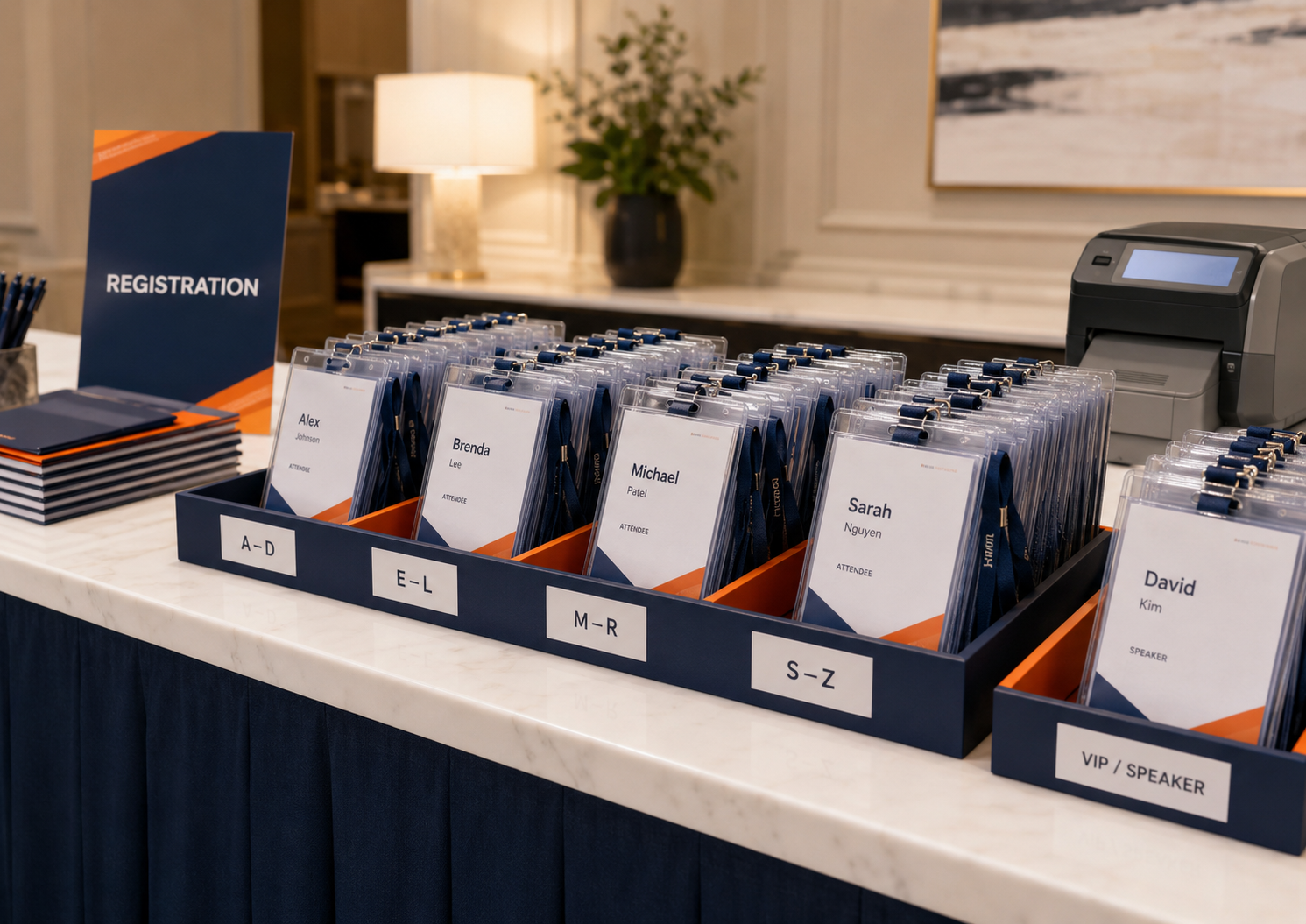
A 600-person event is not going to place 600 registration badges on an open table. Instead, there will typically be two to four staff members at registration assisting with check-ins, with badges organized by badge type and alphabetized by first or last name.
There may also be one or two volunteers guiding attendees and directing them to the correct line. This prevents registration from becoming a free-for-all where attendees are searching for and grabbing their own badges.
The registration team will have the badges organized behind the counter. When attendees reach the front of the line, staff ask for their name and badge type, locate the correct badge, and hand it to them directly.
The main benefit is that the registration team is not stuck spending hours behind the scenes preparing and sorting badges. They have ordered pre-printed badges that arrive already organized. The team simply needs to check attendees in and provide the correct badge.
With multiple people assisting, this keeps registration organized and moving quickly. Having a clear flow and process makes the experience easier for both staff and attendees.
For larger events, when the venue allows it, offering early badge pickup or allowing attendees to collect their badges the day before can also improve the flow on the day of the event. It shows attendees from the moment they arrive that the event is well organized and thoughtfully planned.
Event Badge Printing Checklist
A checklist is useful because badge production includes several interconnected decisions that can become difficult to track in prose.
Confirm the badge type, material, size, and orientation.
Decide whether badges will be pre-printed, printed on-site, or produced through a hybrid model.
Identify attendee categories and access levels.
Prepare and clean attendee data.
Check the spelling and capitalization of names, companies, and titles.
Confirm that attendee categories trigger the correct badge templates.
Review event names, dates, logos, and sponsor branding.
Test long attendee and company names.
Verify QR codes and barcodes using physical samples.
Confirm that every code is unique and connected to the correct attendee.
Check readability from several feet away.
Confirm compatibility with holders, clips, slots, and lanyards.
Review both sides of double-sided badge layouts.
Approve the digital proof and, where possible, a physical sample.
Confirm production, shipping, and delivery dates.
Order spare badge holders, stock, and lanyards.
Prepare for walk-ins, corrections, replacements, and late registrations.
Test on-site printers, devices, power, software, and network access.
Decide how unused badges and attendee data will be handled after the event.
Common Event Badge Printing Mistakes

Making the Name Too Small
A badge may contain accurate information and still fail because nobody can read it.
This commonly happens when the badge design gives more space to decorative graphics, event dates, sponsor logos, or branding than to the attendee’s identity.
The effect becomes visible throughout the event. People lean closer, stare at one another’s badges, or avoid using names altogether.
Overcrowding the Badge
Event organizers sometimes attempt to satisfy every stakeholder by adding everything to the front.
The event logo, venue, dates, company, title, sponsor logos, social handles, agenda, meal choice, attendee category, and code all compete for space.
The badge becomes visually dense, and no element can be understood quickly.
Less important information should move to the back of the badge, event app, program, or registration record.
Failing to Test Codes After Printing
A code that scans from a monitor can fail after it is reduced, printed on textured stock, placed behind reflective plastic, or positioned near a slot punch.
Every final production configuration should be tested physically.
GS1 provides broader barcode placement and quality guidance that reinforces the importance of contrast, dimensions, placement, and clear space:
Ignoring the Holder or Lanyard Hole
Important content near the top of the badge may be covered or pierced during finishing.
Codes positioned near holder seams may become difficult to scan. A single attachment point may cause the badge to rotate backward.
The badge should be designed around the final physical product rather than adjusted after the artwork is completed.
Sending Attendee Data Too Late
Late attendee data reduces the time available for proofing and turns ordinary corrections into production emergencies.
At the same time, forcing an unrealistic early deadline can create unnecessary reprints when attendee information changes.
A staged approach often works better. Finalize the design early, submit stable attendee categories first, and maintain an on-site option for late records.
Failing to Normalize Attendee Data
Registration files may contain all-capital names, inconsistent titles, blank companies, duplicate records, or information stored in the wrong fields.
Variable data reproduces these inconsistencies exactly.
A polished badge template cannot correct an unreviewed data source.
Using Low-Resolution Logos
A sponsor logo that looks acceptable in an email signature may appear blurry when printed.
Event organizers should request vector or high-resolution brand assets, especially when a sponsor has paid for badge placement.
Poor reproduction can create an unnecessary sponsor relationship problem.
Choosing the Wrong Material
A lightweight badge may work for a two-hour reception and deteriorate during a four-day convention.
A waterproof plastic credential may be valuable at an outdoor festival and unnecessary at a short indoor workshop.
Material should be selected according to duration, environment, attachment method, handling, and the desired attendee impression.
Forgetting Walk-Ins and Reprints
Even well-controlled attendee lists change.
A professional event needs a process for substitutions, misspelled names, lost credentials, damaged badges, and unexpected guests.
DIY name tags can provide an emergency backup, but handwritten adhesive labels should not be the primary reprint plan for a high-value conference.
Ordering Too Few Accessories
A printed credential is not useful when the event runs out of holders, clips, or lanyards.
Quantities should include replacements, staff additions, damaged supplies, retained samples, and late registrations.
How to Choose an Event Badge Printing Provider
An event badge printing provider should be evaluated according to the complexity and risk of the event, not only the advertised unit price.
Start by reviewing whether the company has experience with events similar to yours.
A vendor that performs well for 100-person corporate meetings may not have the production model needed for a 3,000-person convention. An enterprise technology provider may be unnecessarily complex for a small academic symposium.
Material options matter because they determine whether the provider can match the event’s duration and environment.
Ask whether the company offers paper, cardboard, inserts, holders, synthetic materials, plastic badges, waterproof options, and different finishes.
Variable data capability is essential. The provider should explain how attendee data is uploaded, mapped, reviewed, protected, corrected, and reprinted.
Ask whether it can support names, titles, companies, categories, sponsor logos, unique codes, and multiple badge templates within one order.
Technology requirements should be discussed specifically.
A provider that says it supports QR codes may only mean that it can print a supplied code image. That is different from generating unique codes, integrating with registration data, supporting lead retrieval, or tracking session attendance.
The proofing process should include realistic attendee records rather than only an empty template.
Data security also deserves direct attention. Attendee files may contain contact information, organizations, ticket categories, and internal classifications.
Ask how files are transferred, who can access them, how long they are retained, and what happens to unused credentials.
Shipping reliability, rush availability, and reprint policies should be documented.
The least expensive supplier can become the most costly option when the event team must reproduce an incorrect or delayed order locally.
Here are Amanda’s thoughts on suppliers and planner issues:
“For most planners, the real purchase is not ink and paper. It is confidence that the right badge will reach the right person before the event team runs out of time to fix a problem.”
After the Event: What Badge Data Can Teach You

Badge printing is usually considered a pre-event or arrival function, but digitally connected credentials can also support post-event analysis.
Check-in records may reveal arrival peaks and help planners staff future registration desks. Session tracking may show which topics attracted interest, although the data needs context.
A person entering a room did not necessarily remain for the entire presentation. An attendee without a session scan was not necessarily absent.
Lead retrieval reports can show exhibitor engagement, but scan volume does not always equal lead quality.
An exhibitor that collected 500 unqualified contacts may receive less value than one that held 50 meaningful conversations with relevant buyers.
Post event survey questions can add qualitative context to badge and scanning data.
Organizers may ask whether check-in was easy, whether names were readable, whether attendees understood how their QR code would be used, and whether the badge made networking easier.
Useful performance questions include:
How long did attendees wait to collect their badges?
Were corrections handled professionally?
Could attendees read names and companies easily?
Did codes scan reliably?
Did exhibitors receive useful lead data?
Were access categories easy for staff to understand?
How many badges were unused or reprinted?
Were credentials comfortable to wear?
Were attendees informed about data collection and privacy?
These findings can influence the next event’s badge design, material, staffing, technology, room layout, and registration deadline.
Conference Badge Alternatives
Traditional conference badges are not the only way to identify attendees or control entry.
Conference badge alternatives can include adhesive name tags, wristbands, digital wallet passes, mobile tickets, stamps, or app-based credentials.
Wristbands work well when durability and admission are more important than displaying a person’s name. They are common at festivals, concerts, and controlled-entry events.
They are less useful at professional networking events because other attendees cannot easily identify the person wearing them.
Mobile credentials reduce physical production but depend on charged devices, accessible screens, and attendee comfort with digital systems.
They can also make social recognition more difficult. An attendee is unlikely to hold a phone-based credential visibly throughout a conference.
Adhesive name tags are inexpensive and flexible but can detach from clothing, damage certain fabrics, and feel informal. They are most appropriate for short workshops, small meetings, or emergency replacements.
A physical badge remains useful because it displays identity throughout the event without requiring a device. It can support human recognition, branding, scanning, and access at the same time.
Some events combine formats. A festival may use wristbands for general admission and laminated credentials for staff. A conference may use printed badges for networking and an event app for agendas and detailed attendee profiles.
Final Perspective
Event badges occupy a small amount of physical space, but they sit at the intersection of registration, networking, branding, sponsorship, access, security, and attendee data.
When badge planning is left until the final stage of an event, organizers are forced to work around incomplete data, crowded layouts, unsuitable materials, and fragile check-in processes.
When badge planning begins earlier, the credential can support faster arrival, clearer attendee categories, stronger exhibitor value, and more natural conversations.
The most effective event badge printing strategy does not begin with the question, “Which design looks best?”
It begins with, “What does this attendee need to do from the moment they arrive?”
That answer determines whether the event needs a pre-printed cardboard badge, a protected insert, a waterproof plastic credential, an on-demand PDF, a barcode, an RFID pass, or a simple and readable name tag.
Frequently Asked Questions about event badges
What Are Standard Event Badges?
Standard event badges are printed credentials used to identify attendees, exhibitors, speakers, sponsors, staff, press, or guests. Common sizes include approximately 3 by 4 inches and 4 by 6 inches.
A standard badge normally includes the attendee’s name, organization, attendee type, and event branding. It may also contain a QR code, barcode, sponsor logo, access level, or schedule information.
How Does On-Site Badge Printing Work?
On-site badge printing connects a registration record to a badge template and a printer located at the event.
An attendee checks in by scanning a confirmation, using a kiosk, or speaking with a staff member. The system finds the attendee details and prints the correct credential on demand.
A dependable setup requires compatible software, printers, badge stock, devices, power, trained staff, spare supplies, and a backup process.
Can Badges Include Security Features Like Serialization, Barcodes, or RFID?
Yes. Badges can include unique serial numbers, QR codes, barcodes, RFID chips, NFC tags, holographic elements, tamper-resistant materials, or visible access categories.
The appropriate level of security depends on the event. A standard conference may need only unique codes, while restricted corporate or production environments may require several layers of verification.
How Can I Print Event Badges With QR Codes or Barcodes?
Create or import a unique code for each attendee and map that code to the correct registration record within the badge template.
The codes can be generated by badge software, imported from a registration platform, or supplied as part of the attendee file.
Print several physical samples and test them with the actual scanners or phones that will be used. Maintain strong contrast and enough clear space around each code.
Can I Customize Badge Design to Reflect My Brand or Event Theme?
Yes. Custom event badges can include brand colors, fonts, event logos, theme graphics, sponsor logos, custom backgrounds, attendee categories, and coordinated lanyards.
Branding should not interfere with readability. The attendee’s name and scanning elements should remain clear under real venue conditions.
What Equipment Do I Need for On-Demand Event Badge Printing?
A basic on-demand setup may include a laptop, compatible printer, badge stock, power supply, software, and internet access or an offline data option.
Larger events may also require tablets, kiosks, scanners, multiple printers, spare equipment, additional stock, and dedicated technical support.
The correct printer depends on badge material, volume, software compatibility, print speed, and whether full color is required.
What Are the Best Practices for Designing Event Badges?
Use a large, readable attendee name, strong contrast, uncluttered badge layouts, and enough white space around QR codes or barcodes.
Test long names, sponsor logo placement, holders, lanyards, slot punches, and physical scan performance. Print an actual-size sample rather than relying only on a screen proof.
What Are the Best Printers for High-Quality Event Badge Printing?
The best printer depends on the chosen badge type.
Standard office printers can work for PDF badges and paper inserts. Thermal printers are often suitable for fast on-site badge printing. Dedicated card printers may be required for rigid plastic badges.
Printer selection should consider reliability, software compatibility, print resolution, stock availability, code quality, and how easily staff can recover from jams or other event-day problems.
What Is the Best Software for Event Badge Printing?
The best type of tools are the platform that fits the event’s attendee data, badge design, registration system, printing method, integrations, and staff capabilities.
A smaller event may need only spreadsheet importing, badge templates, variable data, and print-ready PDF files.
A larger event may require self-service check-in, real-time registration updates, session tracking, access control, lead retrieval, badge integrations, and on-site reprints.
The full workflow should be tested using actual attendee data before the event.
What Are the Benefits of Using On-Demand Badge Printing at Events?
On-demand printing supports walk-ins, late registrations, substitutions, and corrections while reducing the number of unused pre-printed badges.
It can also provide a more professional experience for attendees whose information changes.
The tradeoff is greater dependence on event-day equipment, software, supplies, and staffing. A tested backup process is essential.
What Is Event Badge Printing?
Event badge printing is the process of producing personalized identification or access credentials for people attending or working at an event.
Badges may display names, companies, titles, attendee categories, event branding, QR codes, barcodes, or access permissions.
Can Event Badges Include QR Codes or Barcodes?
Yes. Unique QR codes and barcodes can support check-in, attendee verification, session tracking, lead capture, and access control.
Every code should be tested after printing and connected securely to the correct attendee record.
Should I Print Event Badges Before the Event or On-Site?
Pre-print badges when attendee information is stable and advance quality control is important.
Use on-site printing when walk-ins, substitutions, or late registration changes are common. A hybrid model often provides the best balance for medium and large events.
What Size Should Event Badges Be?
Common event badge sizes include approximately 3 by 4 inches and 4 by 6 inches.
Larger badges provide more room for readable names, organizations, attendee categories, sponsor logos, and codes. The size should also match the intended holder, stock, and lanyard attachment.
How Early Should I Order Event Badges?
Begin selecting the badge type, provider, and design several weeks before the event.
Work backward from the required delivery date and include time for attendee data preparation, proof approval, production, shipping, inspection, and corrections.
Complex, custom, or high-volume badge orders may require additional time.
What Information Should Be on an Event Badge?
Most badges should include the attendee’s name, organization or job title, attendee category, and event branding.
Optional information may include QR codes, barcodes, sponsor logos, access levels, city, chapter, pronouns, or schedule information.
Only information that is necessary and appropriate to display publicly should be printed.
